Wednesday, October 03, 2018

API gateway deployment patterns (based on organisation hierarchy)

Introduction

Most of the large organisations have built a certain organisational culture around how they build, operate and integrate the systems they own which leads to boundaries between teams on what they are responsible for. Over the years I have seen a pattern of organisation hierarchy where the integration systems such as enterprise service bus, API gateway and other messaging appliances are managed by a central team for clear ownership of technology standards and for its benefits from economies of scale in operation.

This article covers API gateway deployment patterns for organisations with such central integration teams. and towards the end article there is a reference table that summarises the capabilities of each option.

This article doesn't cover following in detail:
  • Perimeter security measures implemented in load balancers
  • Applications hosted on public cloud/container orchestration platforms (mostly falls into option1 pattern)

The different patterns covered in the article:
1. API gateway as a lean pipe (option 1)
2. API gateway as a lean pipe with load balancing (option 2)
3. API gateway with service registry/service discovery capability (option 3)

API gateway as a lean pipe (option 1)
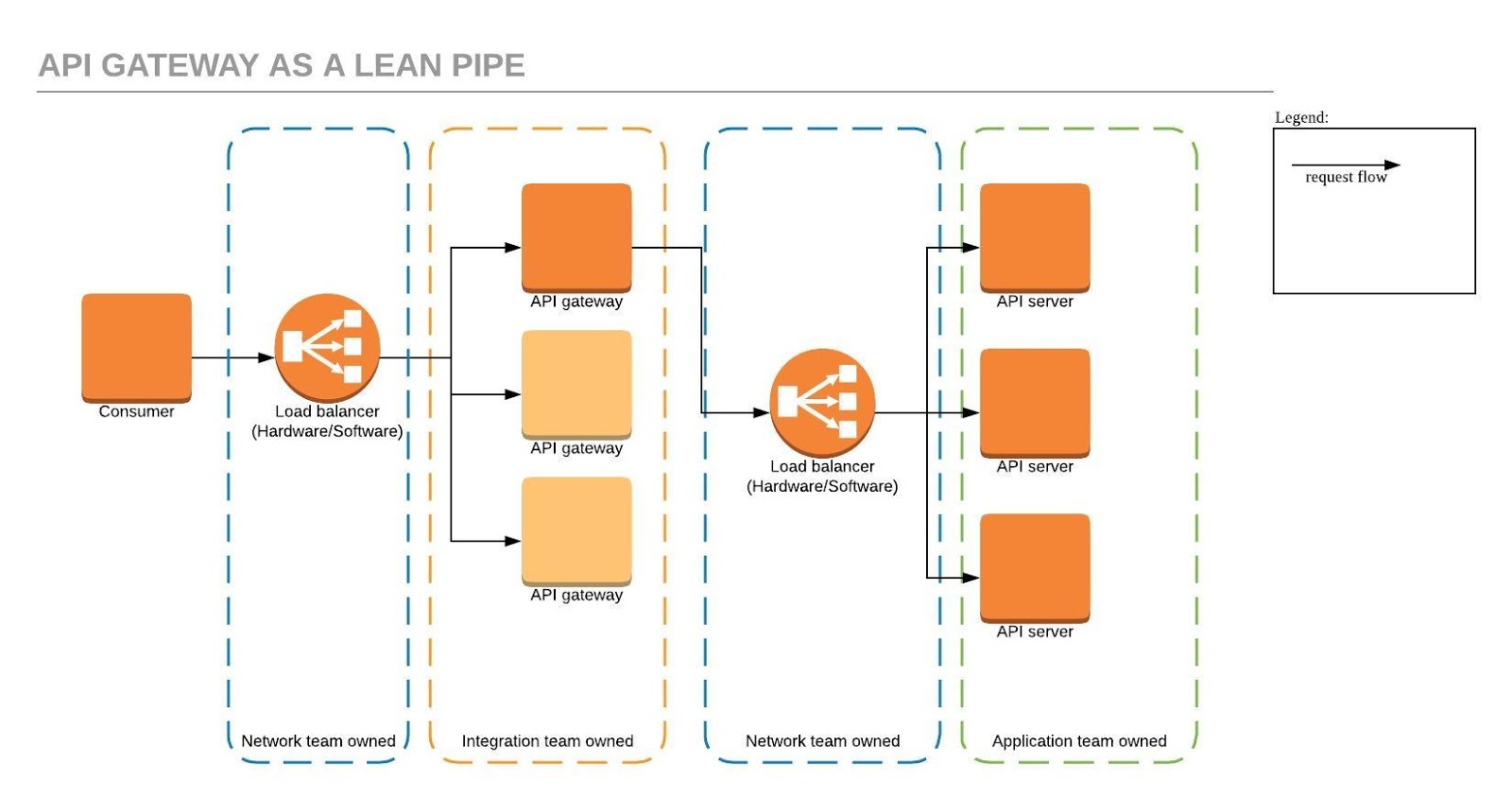

This is a common pattern teams default to. Mostly due to its the natural extension of their existing team boundaries. In this pattern we don't use load balancing, health checking and circuit breaking capabilities that are provided by the api gateway.

Situations such as capacity increases, health based routing, blue-green deployments and DR fail over need to be managed via the load balancer config for each application.

API gateway as a lean pipe with load balancing (option 2)


This is a common pattern for non-critical applications that is build with fixed capacity in mind. In this pattern we use load balancing, health checking and circuit breaking capabilities that are provided by the api gateway, however this leads to static registration of API servers at the API gateway and it makes managing situations such as capacity increases, blue-green deployments and DR fail over very complex to manage operationally as API gateway config needs to be updated in each situation.

API gateway with service registry/service discovery capability (option 3)


This pattern is very similar to option2. It uses service registry and service discovery to minimise the config changes needed by the API gateway thus making is very easy for the applications teams to manage situations such as capacity increases, blue-green deployments and DR fail over quite seamlessly.

Summary

There is no one-size-fit-all solution for API Gateway deployments. Each integration scenario needs to be evaluated carefully and designed for to ensure right capabilities of the gateway are used to deliver the expected outcome. the following table summarises the article.

Criteria
Option 1
Option 2
Option 3
Authentication management at the gateway
Yes
Yes
Yes
Rate limiting / throttling at the gateway
Yes
Yes
Yes
Header based routing at the gateway
Yes
Yes
Yes
Circuit breaking at the gateway
No
Yes
Yes
Load balancing / health checking at the gateway
No
Yes
Yes
DNS/lookup based routing at the gateway
No
No
Yes
No of components a request pass through
5
4
3
Single point of failures
2
1
0
Capacity increase / failover logic in gateway config 
No
Yes
No

How does your organisation tackle API gateway deployment? Join the conversation and leave a comment.

Monday, January 02, 2017

Books I've read during 2015 and 2016

These are the books that kept me company during the last two years, and i'd recommend anyone to read them if you have the time. I'm planning to re-read them sometime in the future and add my summary to each book so I can make better recommendations.

The books are broken down in to three broad categories:

1. Technology - all technology related books including architecture, software team management, mobile app design, devops, etc.. I didn't see the point of breaking them down further.

2. Financial - this category is dedicated to personal finance, wealth management, business modelling and economical books.

3. Personal - covers other books that didn't fit well into the first two categories.

Given how forgetful I'm at times Im sure I will forget the fine-print of the contents in these books. But having read them, now I'm more confident in finding the right reference when I need this information again.

Happy reading and happy learning everyone!!!

Technology


Financial


Personal


* note - all amazon links are generated using the affiliate product links

Friday, March 11, 2016

HTC Desire Z upgrade to ICS

Well now that I've managed to downgrade and root my HTC Desire Z, I think its time to start pushing newer roms to check how the phone takes the upgrades. this is purely for testing purposes.

The write up for downgrade and rooting can be found at the following link.

So the first step is to find a ROM thats stable enough to test. After reading up different forums I thought to stick with Andromadus Mimicry rom.
* http://forum.xda-developers.com/showthread.php?t=1714187

Here's the summary of the steps that I followed.

1. Download the relevant files (Rom and gaaps)
*http://forum.xda-developers.com/showthread.php?t=1714187#post27494282

2. Move the downloaded files to the same place as the "adb" executable
*./adb push mimicry-1.5.0.zip /mnt/sdcard/
*./adb push gapps-ics-20120429-signed.zip /mnt/sdcard/

3. Make a nandroid backup for your current rom
* ./adb reboot recovery
* go to 'backup and restore' on the CWM menu
* select 'backup'

4. Clear cache and wipe all data
* from CWM screen choose 'wipe data/factory reset'
* once thats done select 'wipe cache partition'

5. Install the ROM and GAAPS
* from CWM menu select 'install zip from SD card'
* from CWM menu select 'choose zip from SD card'
* select the mimicry zip first
* follow the graphical installer steps and finish the installation (i didn't choose the wifi calling option for T-Mobile)
* once done choose gaaps zip file from CWM menu
* once both installations are done run './adb reboot recovery'
* and select 'reboot system now'
* have patience this will take some time :)

All good to go. Im going to test this Rom for few days before updating it to KitKat next.

Tuesday, March 08, 2016

Rooting and upgrading HTC desire Z (v2.3.3) using OS X

Found my old HTC Desire Z phone lying around and thought I'd learn how to root/upgrade the phone and get some usage out of it. I've never wanted to root this device before so all articles that Im reading now is seems to be somewhat outdated. Because of all the reading involved I'm documenting the steps I took for future reference. :)

Steps:
1. Read on installing ADB on your Mac. and all useful information on the reference sections.
http://htc-one.wonderhowto.com/how-to/install-adb-fastboot-mac-os-x-send-commands-your-htc-one-0151178/
*I didnt run the install script, instead i decided to use the executable within the folder it self. eg "./edb devices"

2. ADB for dummies
http://forum.xda-developers.com/showthread.php?t=879701

3. Read on downgrading to stock rom.
http://forum.xda-developers.com/showthread.php?t=1178912
*go to the last page of comments to find the latest links for stockimg download, as the links on the main article doesnt work any more.

4. As Im going to update it to CM based image, follow the CM guide for getting a permanent root on your desire Z. And once the rooting is done install CM7 and google apps for CM7.
https://wiki.cyanogenmod.org/w/Install_CM_for_vision#Rooting_the_Desire_Z
*get the missing files from the link below http://www.desire.tode.cz/how-to-root-htc-desire-z-g2-vision/

If you follow all the steps carefully this will be a breeze. It took me more time for me to find the old ROM than to run all the scripts accordingly.

This ROM is truly stable and a pleasure to work with. However I will try to upgrade it to ICS based rom and see how well that performs.

Monday, July 21, 2014

Launching EC2 instances - Amazon Web Services (AWS)

I hope this article will help some you who is still under the impression that AWS allows you to launch any no of instances on any region instantly.

I had the same misunderstanding till today, and learnt that you need to request them before hand to increase your quota on no of instances you can launch within a region.

First, you should read this page. It allows you to get an idea about all soft limitations on AWS services( please note that all these ec2 limitations can be revised apon your request)
http://docs.aws.amazon.com/general/latest/gr/aws_service_limits.html#limits_ec2 

You can also read about it from the EC2 FAQ page as well.
http://aws.amazon.com/ec2/faqs/#How_many_instances_can_I_run_in_Amazon_EC2

Hope AWS team will understand the value of the lost time due to this manual step involved in provisioning certain types of servers for the first time.

Error Msg:
You have requested more instances (1) than your current instance limit of 0 allows for the specified instance type. Please visit http://aws.amazon.com/contact-us/ec2-request to request an adjustment to this limit.

Few other great resources I found that helps to decide which AMI to select for a given instance type:

1. Ubuntu EC2 image locator - http://cloud-images.ubuntu.com/locator/ec2/
2. AWS Linux instance type matrix - http://aws.amazon.com/amazon-linux-ami/instance-type-matrix/

Wednesday, July 02, 2014

google-api python access through refresh token

I couldn't find a single python example on the web that explain how to get an access token to connect to google APIs using a pre-created refresh token.

Note that this is a sample code I wrote so it is far from being production ready. Don't forget to add values to REFRESH_TOKEN, CLIENT_ID, CLIENT_SECRET, REDIRECT_URI and OAUTH_SCOPE variables based on your app settings.

feel free to comment on the code below, Specially on my novice python coding skills.


#!/usr/bin/python

import httplib2
import pprint

from apiclient.discovery import build
from apiclient.http import MediaFileUpload
from oauth2client.client import OAuth2WebServerFlow
from oauth2client.client import OAuth2Credentials
from oauth2client import GOOGLE_AUTH_URI
from oauth2client import GOOGLE_REVOKE_URI
from oauth2client import GOOGLE_TOKEN_URI

#Refresh token
REFRESH_TOKEN = ""

# Copy your credentials from the console
CLIENT_ID = ''
CLIENT_SECRET = ''

## Check https://developers.google.com/drive/scopes for all available scopes
OAUTH_SCOPE = ['https://www.googleapis.com/auth/drive','http://localhost:5001/storage/getGDriveAuth']

## Redirect URI for installed apps
REDIRECT_URI = ''


credentials = OAuth2Credentials(None, CLIENT_ID,
                               CLIENT_SECRET, REFRESH_TOKEN, None,
                               GOOGLE_TOKEN_URI, None,
                               revoke_uri=GOOGLE_REVOKE_URI,
                               id_token=None,
                               token_response=None)

# Create an httplib2.Http object and authorize it with our credentials
http = httplib2.Http()
http = credentials.authorize(http)

drive_service = build('drive', 'v2', http=http)
file = drive_service.files().list().execute()

pprint.pprint(file)
exit();

fixing "npm install jshint" error on #chef #nodejs

Error output:
npm ERR! Error: No compatible version found: date-now@'^0.1.4'
npm ERR! Valid install targets:
npm ERR! ["0.1.0","0.1.1","0.1.3","0.1.2","0.1.4","1.0.0"]


If you get the above error while installing/updating your test servers with #chef, you will need to update the version of npm that is installed on your machine. (ref: https://github.com/npm/npm/issues/5298)

I use the nodejs chef cookbook (http://community.opscode.com/cookbooks/nodejs) to install npm, so updating the npm install version variable to 1.4.19 worked like a charm.

File: /cookbooks/nodejs/attributes/default.rb
Change: default['nodejs']['npm'] = '1.4.19'

While reading through the source I noticed that this cookbook isn't using the install script provided by npmjs site(https://www.npmjs.org/doc/README.html) for installing npm. sounds like an opportunity for any #chef lover to contribute and update the cookbook.